> ## Documentation Index
> Fetch the complete documentation index at: https://elementary-devin-1782754750-bigquery-permissions-docs.mintlify.site/llms.txt
> Use this file to discover all available pages before exploring further.
# Data Quality Code Review
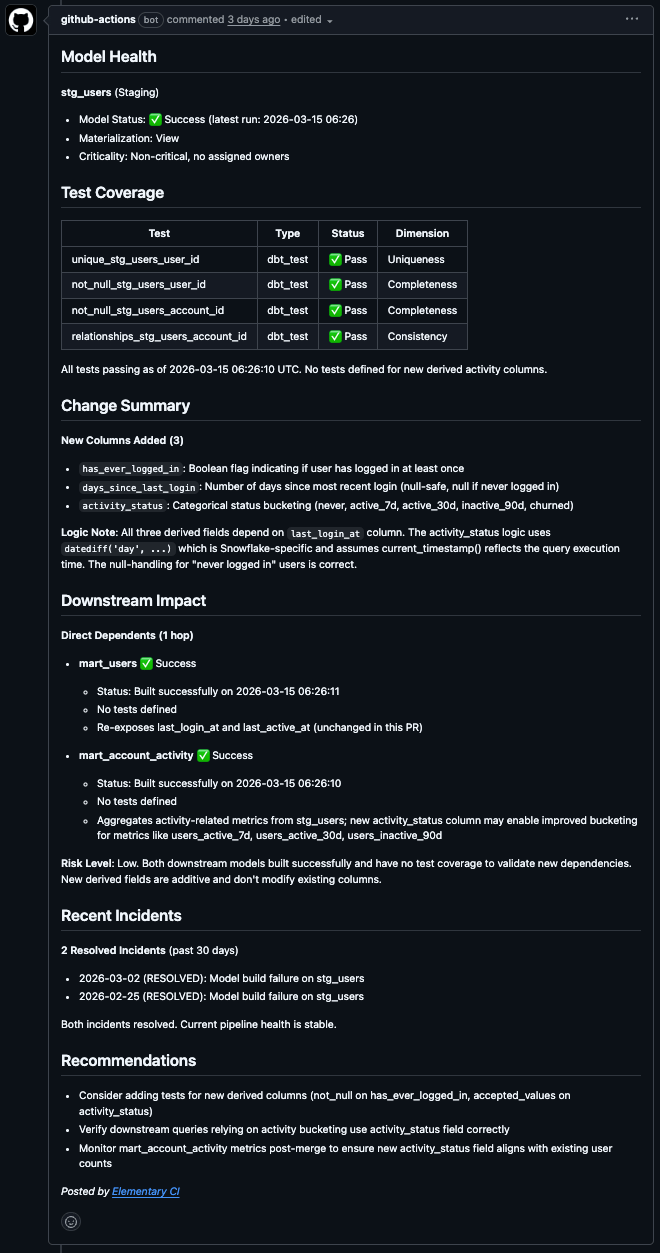
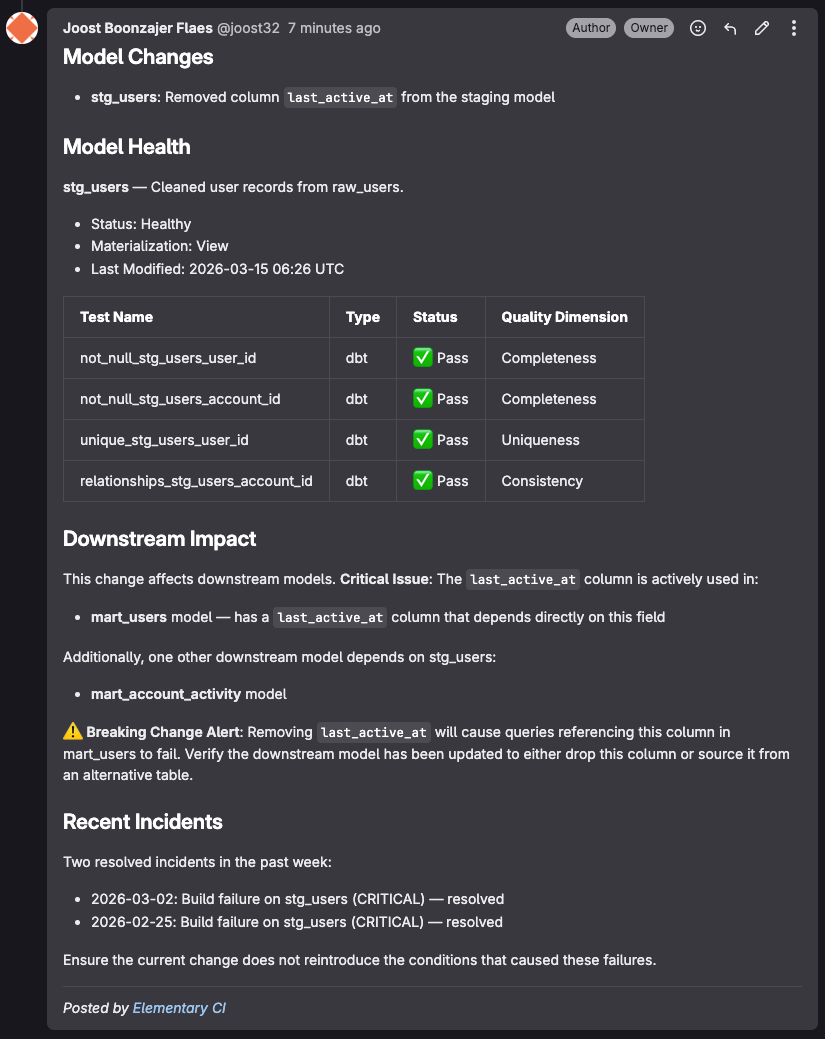
Elementary posts a structured data quality comment on every pull request that touches your dbt models, giving reviewers live context on test history, incidents, downstream impact, and merge risk — without leaving the PR.
 ## What the review includes
* **Change analysis:** flags NULL risks, type mismatches, and join changes that could alter row counts
* **Performance & cost:** SQL anti-pattern detection (SELECT \*, cross joins, missing filters on large tables) with volume context
* **Downstream blast radius:** which models, pipelines, and dashboards depend on what's changing, including column-level impact for renamed or removed columns
* **Tests & incidents:** pass/fail history for each changed model, active data quality incidents, and coverage gaps on new columns
* **Risk summary:** a plain-language assessment of whether it's safe to merge, with prioritized recommendations
The comment is concise when everything looks clean. It expands only when there are actual issues to flag, and updates automatically on every new push.
## How it works
When a PR is opened or updated:
1. A CI job sends the repository name and branch to Elementary's API
2. Elementary fetches the diff, runs static SQL analysis, and queries live data quality context for the changed models
3. A structured Markdown comment is posted on the PR or MR
## Setup
### Prerequisites
* An Elementary Cloud account with a [code repository connected](/cloud/integrations/code-repo/connect-code-repo)
* An [Elementary API key](/cloud/integrations/code-repo/connect-code-repo)
### GitHub Actions
Create `.github/workflows/elementary-review.yml` in your dbt repository:
```yaml theme={null}
name: Elementary Data Quality Review
on:
pull_request:
paths:
- "models/**/*.sql"
- "models/**/*.yml"
- "dbt_project.yml"
jobs:
elementary-review:
runs-on: ubuntu-latest
permissions:
contents: read
pull-requests: write
issues: write
steps:
- uses: actions/checkout@v4
with:
fetch-depth: 0
- uses: elementary-data/elementary-ci@v1
with:
elementary-api-key: ${{ secrets.ELEMENTARY_API_KEY }}
```
Go to **Settings > Secrets and variables > Actions** in your GitHub repository and add:
| Secret | Required | Description |
| -------------------- | -------- | ------------------------------------------------------------------------------------------------------ |
| `elementary_api_key` | Yes | Your Elementary Cloud API key |
| `elementary_env_id` | No | Your Elementary environment ID. Only needed when the repository is connected to multiple environments. |
The review only runs on PRs that touch model files. Other PRs are ignored.
This works for pull requests opened from branches within the same repository. GitHub does not pass repository secrets to `pull_request` workflows triggered by forks or Dependabot.
If your repository is connected to multiple Elementary environments, add `env-id` to specify which one to use:
```yaml theme={null}
- uses: elementary-data/elementary-ci@v1
with:
elementary-api-key: ${{ secrets.ELEMENTARY_API_KEY }}
elementary-env-id: "169e9308-9a70-4200-b810-ad486cb42f3a"
```
The environment ID is the UUID in your Elementary Cloud URL. For example, in `https://app.elementary-data.com/169e9308-9a70-4200-b810-ad486cb42f3a/report/dashboard`, the environment ID is `169e9308-9a70-4200-b810-ad486cb42f3a`.
If you don't specify an `env-id` and the repository is connected to only one environment, it will be selected automatically. If connected to multiple, the review will return an error listing the available environment IDs.
### GitLab CI
```yaml theme={null}
include:
- remote: 'https://raw.githubusercontent.com/elementary-data/elementary-ci/v1/templates/mr-review.yml'
```
Go to **Settings > CI/CD > Variables** and add:
| Variable | Masked | Required | Description |
| -------------------- | ------ | -------- | ----------------------------------------------------------------------------------------------------------- |
| `elementary_api_key` | Yes | Yes | Your Elementary Cloud API key |
| `elementary_env_id` | Yes | No | Your Elementary environment ID. Only needed when the repository is connected to multiple environments. |
| `gitlab_api_token` | Yes | No | Project Access Token with `api` scope. Only needed if you cannot enable CI/CD job token access (see below). |
To post the MR comment, the template uses one of two authentication methods:
* **`CI_JOB_TOKEN` (default):** GitLab's built-in job token, available automatically in every pipeline. Requires a project admin to enable **Settings > CI/CD > Token Access > Allow CI/CD job tokens to access this project's API**.
* **`GITLAB_API_TOKEN` (alternative):** If this variable is set, it takes priority over `CI_JOB_TOKEN`. Use a Project Access Token with `api` scope. This works without any admin settings change and is the easier option if you don't have project admin access.
## What the review includes
* **Change analysis:** flags NULL risks, type mismatches, and join changes that could alter row counts
* **Performance & cost:** SQL anti-pattern detection (SELECT \*, cross joins, missing filters on large tables) with volume context
* **Downstream blast radius:** which models, pipelines, and dashboards depend on what's changing, including column-level impact for renamed or removed columns
* **Tests & incidents:** pass/fail history for each changed model, active data quality incidents, and coverage gaps on new columns
* **Risk summary:** a plain-language assessment of whether it's safe to merge, with prioritized recommendations
The comment is concise when everything looks clean. It expands only when there are actual issues to flag, and updates automatically on every new push.
## How it works
When a PR is opened or updated:
1. A CI job sends the repository name and branch to Elementary's API
2. Elementary fetches the diff, runs static SQL analysis, and queries live data quality context for the changed models
3. A structured Markdown comment is posted on the PR or MR
## Setup
### Prerequisites
* An Elementary Cloud account with a [code repository connected](/cloud/integrations/code-repo/connect-code-repo)
* An [Elementary API key](/cloud/integrations/code-repo/connect-code-repo)
### GitHub Actions
Create `.github/workflows/elementary-review.yml` in your dbt repository:
```yaml theme={null}
name: Elementary Data Quality Review
on:
pull_request:
paths:
- "models/**/*.sql"
- "models/**/*.yml"
- "dbt_project.yml"
jobs:
elementary-review:
runs-on: ubuntu-latest
permissions:
contents: read
pull-requests: write
issues: write
steps:
- uses: actions/checkout@v4
with:
fetch-depth: 0
- uses: elementary-data/elementary-ci@v1
with:
elementary-api-key: ${{ secrets.ELEMENTARY_API_KEY }}
```
Go to **Settings > Secrets and variables > Actions** in your GitHub repository and add:
| Secret | Required | Description |
| -------------------- | -------- | ------------------------------------------------------------------------------------------------------ |
| `elementary_api_key` | Yes | Your Elementary Cloud API key |
| `elementary_env_id` | No | Your Elementary environment ID. Only needed when the repository is connected to multiple environments. |
The review only runs on PRs that touch model files. Other PRs are ignored.
This works for pull requests opened from branches within the same repository. GitHub does not pass repository secrets to `pull_request` workflows triggered by forks or Dependabot.
If your repository is connected to multiple Elementary environments, add `env-id` to specify which one to use:
```yaml theme={null}
- uses: elementary-data/elementary-ci@v1
with:
elementary-api-key: ${{ secrets.ELEMENTARY_API_KEY }}
elementary-env-id: "169e9308-9a70-4200-b810-ad486cb42f3a"
```
The environment ID is the UUID in your Elementary Cloud URL. For example, in `https://app.elementary-data.com/169e9308-9a70-4200-b810-ad486cb42f3a/report/dashboard`, the environment ID is `169e9308-9a70-4200-b810-ad486cb42f3a`.
If you don't specify an `env-id` and the repository is connected to only one environment, it will be selected automatically. If connected to multiple, the review will return an error listing the available environment IDs.
### GitLab CI
```yaml theme={null}
include:
- remote: 'https://raw.githubusercontent.com/elementary-data/elementary-ci/v1/templates/mr-review.yml'
```
Go to **Settings > CI/CD > Variables** and add:
| Variable | Masked | Required | Description |
| -------------------- | ------ | -------- | ----------------------------------------------------------------------------------------------------------- |
| `elementary_api_key` | Yes | Yes | Your Elementary Cloud API key |
| `elementary_env_id` | Yes | No | Your Elementary environment ID. Only needed when the repository is connected to multiple environments. |
| `gitlab_api_token` | Yes | No | Project Access Token with `api` scope. Only needed if you cannot enable CI/CD job token access (see below). |
To post the MR comment, the template uses one of two authentication methods:
* **`CI_JOB_TOKEN` (default):** GitLab's built-in job token, available automatically in every pipeline. Requires a project admin to enable **Settings > CI/CD > Token Access > Allow CI/CD job tokens to access this project's API**.
* **`GITLAB_API_TOKEN` (alternative):** If this variable is set, it takes priority over `CI_JOB_TOKEN`. Use a Project Access Token with `api` scope. This works without any admin settings change and is the easier option if you don't have project admin access.
 ## Troubleshooting
**No comment appears after the job runs**
Make sure `contents: read`, `pull-requests: write`, and `issues: write` are set under `permissions` in the workflow. An explicit `permissions` block sets any unlisted scope to `none`, so omitting a required scope causes the step to fail silently.
**The review says the repository is not connected**
Go to **Settings > Environments** in Elementary Cloud and verify your repository is connected.
**The review says the repository is connected to multiple environments**
Add `elementary-env-id` to your workflow. The error message lists the available environment IDs.
If a model has never been synced through Elementary, the comment will note that no history is available yet. Results populate automatically after the next Elementary sync.
## Troubleshooting
**No comment appears after the job runs**
Make sure `contents: read`, `pull-requests: write`, and `issues: write` are set under `permissions` in the workflow. An explicit `permissions` block sets any unlisted scope to `none`, so omitting a required scope causes the step to fail silently.
**The review says the repository is not connected**
Go to **Settings > Environments** in Elementary Cloud and verify your repository is connected.
**The review says the repository is connected to multiple environments**
Add `elementary-env-id` to your workflow. The error message lists the available environment IDs.
If a model has never been synced through Elementary, the comment will note that no history is available yet. Results populate automatically after the next Elementary sync.